Hi again, how do I go about inserting back buttons on the pages such as in the cart and on product pages please?
A
Amar
Original poster
Member

Hi again, how do I go about inserting back buttons on the pages such as in the cart and on product pages please?
Hi Amar
We don’t get it. Do you have any example for us to show?
Best Regards
.
Hi Amar
Ok We get it.
To add button or any content in the product archive page, you need to modify the woocommerce.php file located in the root directory ( wp-content/themes/own-shop).
Just open this file with any text editor and add your button code after line number 16
Hope this will help.
Also these changes will be lost if you update the theme so make sure you do not update the theme.
Best Regards
ok I will give it a try and how does one update a theme?
Hi Amar,
Updating a theme is very simple. You just have to click on the update link when there is an update. You can also view
youtube videos for that.
Best Regards
is there anyway to edit the shop, product and cart pages with elementor, is there a way to add a back button and design stuff using that way? i can only seem to manage the home page and such with elementor. also is it possible to change the product page layout, is there way like using templates just do change the one page and do you know of any please?
Hi Amar
These pages are not normal pages and we have to rely on the WooCommerce plugin for their functionality.But
you can do it using the Elementor Pro plugin I guess. They have the option to modify the product, cart and checkout pages using their page
builder.
Best Regards
I will have to try and see which is the best possible solution, the checkout page is all that i would like a more better template applied to it.
is there any way to tweak the related products at the bottom of the product page, cant seem to find a way to change which products are being shown thanks
Hi Amar
You can’t specify the related product according to yourself.
It shows products automatically based on similar products. Read more about this here
Set up Related Products
Best Regards
Yes this worked by adding tags, thank you. Another issue is the 404 page please, does this template have one that can be edited, if not is there any way to go about this thanks.
Hi Amar,
Yes, there is a 404.php page in the root directory of the theme. You can try to customize it.
Best Regards
I noticed there was an update to the theme but could find what was changed, you you please tell me briefly
Hi Amar,
Hope you are doing good.
Yes, we have released a theme update in which we have fixed the minor issues.
ie
-- Browse category section woocommerce independent
-- removed elementor as a recommended plugin
-- cart page mobile fixed
If you have modified your theme, I suggest you NOT update the theme as it will erase every change you have made in your theme.
Best Regards
Hi im just wondering if it is possible to change the “all categories” dropdown that is on the right of the search box to maybe show brands or other pages please?
Also with this template is there way to change the layout of how the product name and price is shown( can the price be shown under the product name instead of to the right), thanks
Hi Amar
You can have any menu of your choice. All you have to do is to create a new menu (Appearance -> Menus) and then add menu items to it. Then select
the Category Menu as display location.
Best Regards
Hi Amar
For this, you have to provide us your website URL so that we can provide you some CSS
Best Regards
Ive got another issue and my logo is now appearing on the right hand side of the screen instead of the left after experimenting with the style-main files. anyway I can revert it back please, i cntrl-z everything before saving so im not sure how this has occurred?
Hi ignore the last reply I have fixed it and im not able to provide the website, is there a guide or way I can manually do myself please
Hi Amar
No issues. You can try the following CSS to do this
.woocommerce ul.products li.product .woocommerce-loop-product__title {
    display: block;
    float: none;
    width: 100%;
    text-align: center;
}

.woocommerce ul.products li.product .price {
    display: inline-block;
}

.woocommerce ul.products li.product .price {
    text-align: center;
    float: none;
}
Copy & Paste it in Appearance -> Customize -> Additional CSS
Best Regards
Hi, the css code worked a charm thanks. another change im trying to make is to make the header background green please (not the top bar) by default it is white, anyway in which i can make it green without creating a whole new header please?
Hi Amar,
To change header background using CSS. Try the following CSS :
header {
background: #1cc11a;
}
Best Regards
Thank you so much, you support is always appreciated.
Hi, on the mobile view im finding that my logo is higher than the menu bar, when i remove the logo then the menu bar rises, anyway i can have them both at the same level please?
Hi Amar,
We need your website URL for this issue. Please mention your website URL
Best Regards
Hi Amar
Try the following CSS
@media only screen and (max-width: 370px) {
    .style1 .header-wrapper .logo {
        width: 38% !important;
    }
}
Copy & Paste it in Appearance -> Customize -> Additional CSS
Best Regards
Hi, thank you this worked on phone such as samsung s21 but on older version such as samsung s9 it does not. do i need to change the px or the % of the width?
Hi Amar,
Yes, you can target any screen size using the same method.
Just write down a new CSS. For example
@media only screen and (max-width: 300px) {
    .style1 .header-wrapper .logo {
        width: 30% !important;
    }
}
Please change the screen width according to your requirements and also the logo width
Best Regards
Hi, is there any way i can stop my widgets in my woocommerce side bar from moving when i scroll down, i dont want to use sticky because i want the widgets to only be shown at the top of the page, thanks.
Hi Amar
We are using the Theia Sticky sidebar js file for this. To remove this you’ve to do some code changes.
1) First of all open functions.php file with any text editor
2) Find theia-sticky-sidebar in the file and then remove this line
wp_enqueue_script( 'theia-sticky-sidebar', get_template_directory_uri() . '/js/theia-sticky-sidebar.min.js',array(),'1.7.0', true );
3) Then in main.js file inside the js folder, remove these two lines
/*-- Sticky Sidebar --*/
$('#sidebar-wrapper, #post-wrapper').theiaStickySidebar({minWidth: 1024});
$('#woo-sidebar-wrapper, #woo-products-wrapper').theiaStickySidebar({minWidth: 1024});
4) once done, copy the entire code of main.js and paste it on the Input Javascript of
https://www.toptal.com/developers/javascript-minifier/
5) After that click on minify button to minify js and copy the minify js and paste it into main.min.js file
Best Regards
worked, thanks. is there anyway to edit the mobile menu, i kind of want to add padding so the search bar and the close (x) are pushed down a bit?
Hi Amar
Try the CSS below
/* mobile menu close button */
.hd-bar .hd-bar-closer {
    top: 35px;
}

/* mobile menu padding */
.hd-bar-wrapper {
    padding-top: 60px;
}
Edit the number values accordingly
Best Regards
Hi,
is there a way to enable page breadcrumbs within this theme, ive tried plugins but the theme does not show them?
also is there a way to add padding to the back-to-the-top button to move it higher up the page?
Thanks
Hi Amar,
For the breadcrumbs, you’re missing the code that you have to add to the page title. Read the docs and add that code to the page title of this theme.
For the back to top button try the CSS below
.btntoTop {
    bottom: 100px;
}
You can increase/decrease the number 100 also to fit the position
Best Regards
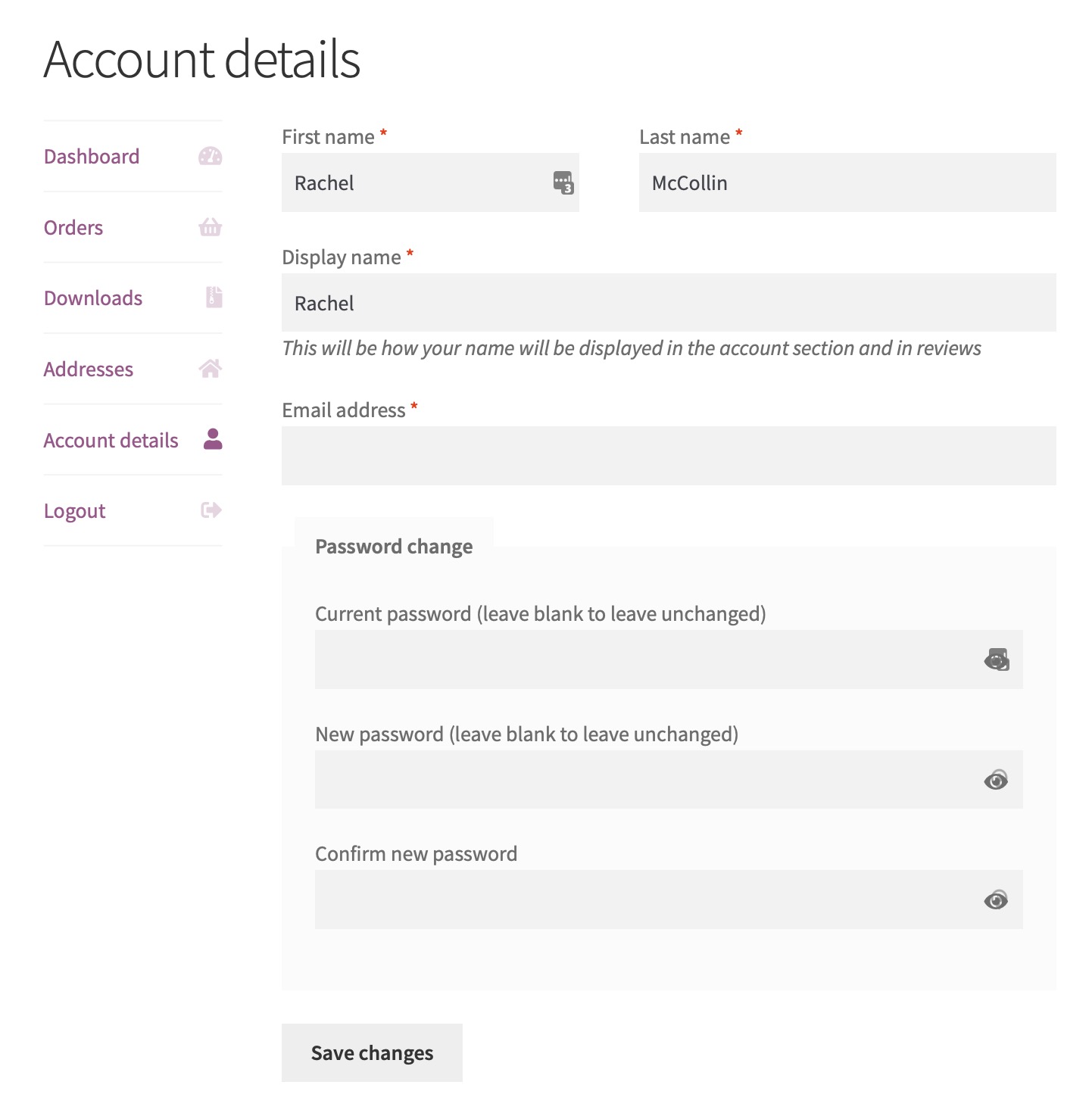
Hi, is there anyway to hide the “display name” block on the my account edit page please?
Hi Amar
Could you please attach a screenshot of the page section where you want to hide the name?
Best Regards
do you have email?
hi, if you can see this example where it shoes “display name” box, can this be removed with css because i dont want customer to change their display name please?
https://www.cozmoslabs.com/wp-content/uploads/2020/03/default-WooCommerce-edit-profile-form.jpg
Hi, I sent example link: https://www.cozmoslabs.com/wp-content/uploads/2020/03/default-WooCommerce-edit-profile-form.jpg
Anyway to remove “display name”
Hi Amar
Please check your email for the reply
Best Regards
Hi is there anyway to remove google fonts from the theme, ive tried plugins which disables them but still are being loaded which is adding to the page size?
Hi also im wondering is there a way to totally remove the header and footer, ive replaced them but when doing page speed checks my font size is high and original header is still there behind the new one i created, is there a way to completely remove this please.
Hi Amar
to remove Google fonts you’ve to remove the following lines from functions.php file
Best Regards
Hi Amar,
This also involves editing header.php and footer.php files
First of all open header.php and comment line no 49. Check screenshot below
Now next open footer.php and add HTML comments as shown in screenshot
Best Regards
Hi, is there a way for me to add a “add to cart” button underneath the price in the shop page ( not single product page) at the moment you have to hover over the image to see it.
Hi Amar
Unfortunately this can’t be done using CSS alone. This involves modifying the PHP Code and other JS files also
Best Regards
If you could provide the code and guide, i can attempt this.
Hi, is there a way to make the categories and the products appear smaller on the shop page in terms of mobile view.
Hi Amar
Apologies for the late reply to the previous post as it is difficult for us to dive deep into our code and provide custom functionality for all of our users. Hope you understand that
Best Regards
Hi Amar
Please mention the website URL in the text so that we can provide you the exact solution
Best Regards
Sorry one more thing, is there a way to add a quantity features as in the quantity increments next to the cart logo on the archive pages?
Hi Amar
The issue is more related to the WooCommerce plugin.
Our theme just shows the user interface and all the products in responsive mode are controlled by the WooCommerce plugin itself.
If we try to add our CSS then it might alter the functionality of the plugin.
What you can do is post your question to the WooCommerce plugin support. Below is the link to that
https://wordpress.org/support/plugin/woocommerce/
let us know if you have any questions
Best Regards
Hi Amar
I found some excellent tutorials on web for this. Please go through it and try it out.
https://shopplugins.com/add-a-quantity-field-to-the-woocommerce-archive-pages/
https://christianvarga.com/how-to-add-quantity-to-product-archives-in-woocommerce-and-keep-ajax/
Best Regards
Hi,
Ok will contact them but in the mean time could you provide some css for me to give a try such as maybe lowering the margins fields to 33% to see if it accept 3 columns and also lowering the text sizes?
Hi, I tried the two tutorials you sent for the quantities but they dont seem to work, other have had issues too, could you provide your own css and function please?
Also I was unable to get the themes breadcrumbs to show up if you could help with that too please?
Hi Amar,
We don’t have such functionality in our theme, it’s like a custom feature that would cost you if we develop this or try to add this in your theme.
Best Regards
Hi Amar,
We have this functionality already in our PRO addon. We suggest you to go for our PRO addon if you want to have breadcrumbs in your theme
Let us know if you have any questions
Best Regards
Hi, How can i enable quick view on the shop pages as i only have the cart button?
Hi Amar
Install YITH WooCommerce Quick View plugin
and you’ll have the option for Quick view on hover
Best Regards
Hi,
Im having an issue, in the screenshots you can see my site on desktop fails to show the quantity field but on mobile view it shows it correctly, any way to fix this, thanks.
Hi Amar
Without the actual page URL, I can’t provide you CSS solution
Please add the page URL in the Website Textbox when replying
Best Regards
Hi Amar
Try the CSS below
.woocommerce .quantity .qty {
width: 4.631em;
}
Copy & Paste it in Appearance -> Customize -> Additonal CSS
Best Regards
worked, thanks
You are welcome 🙂
Best Regards
Hi so the theme only allows the max 32 products to be shown on a page (even with store customizer plugin), How can increase the number please?
Hi Amar
I just tried to increase the Rows Per Page in Appearance -> Customize -> WooCommerce -> Product Catalog and it shows all the 50 products at once
on my local site.
Did you try to change the number in Rows Per Page?
Best Regards
Yes i tried ive tried this and the max that’s is shown is still 32, it wont increase?
any ideas please?
Hi Amar
We are not able to reproduce this issue on our test website. We can add any number of rows using the Rows per Page setting.
It might be coming from any plugin setting or your custom coding
Best Regards
I tried it.. and it’s work. Thank you @tubidy
Support for SpiracleTheme typically focuses on helping users customize, troubleshoot, and optimize the theme’s features for their site. It provides guidance on layout setup, styling adjustments, and plugin compatibility to ensure a smooth user experience. With clear documentation and responsive assistance, SpiracleTheme support helps users maintain a polished and functional design.
Sad Poetry
Informative, engaging, and beautifully written—this post deserves appreciation! — Dushman Poetry.
Truly an inspiring and well-crafted article. The effort behind this content is clearly visible. Kudos to ess-utumishigo for such great work.